

A flight tracking transfer workflow is the real-time integration that links live flight status data directly to your ground dispatch system, so every driver release, pickup timing, and fleet reallocation happens automatically based on what the aircraft is actually doing. Instead of relying on scheduled times or passenger calls, your system subscribes to a flight status API using the flight number as the binding key, then reacts to status transitions like Delayed, Arrived, or Diverted with pre-programmed dispatch actions. The result is predictive coordination rather than reactive scrambling. Tools like ForeFlight Dispatch and workflow automation platforms like n8n sit at the center of this architecture, turning raw aviation data into ground-level operational decisions.
- Flight number binds each booking to a specific aircraft for continuous tracking.
- Status transitions (Scheduled, Delayed, Arrived, Diverted) trigger automated dispatch events.
- Real-time API fields replace manual monitoring of airline boards or passenger calls.
- Automated workflows prevent "ghost flight" dispatches when a flight cancels quietly.
How does real-time flight tracking integrate into your transfer workflow?
The integration starts at booking capture. When a passenger books a transfer, the flight number enters your system as a first-class data field, not a notes field. That number becomes the unique key your dispatch engine uses to subscribe to live status updates through a flight status API, pulling real-time ETA, gate arrival, delay signals, and cancellation alerts continuously.
| API Field | What It Delivers | Dispatch Action Triggered |
|---|---|---|
flight_number | Unique aircraft identifier | Binds booking to live tracking queue |
real-time status | Scheduled / Delayed / Arrived / Diverted | State machine trigger for fleet allocation |
gate arrival time | Actual on-blocks timestamp | Starts buffer countdown for driver release |
terminal / gate | Physical pickup location | Updates driver app with correct terminal |
delay / cancellation | Early warning of disruption | Pauses or releases driver assignment |

Workflow automation tools like n8n handle the continuous polling and event routing between your flight API and your dispatch platform. You configure n8n to watch each tracked flight number, then fire specific webhook actions when a status field changes. A shift from "Scheduled" to "Delay" automatically suspends the dispatch countdown. A shift to "Arrival" triggers the final driver routing calculation. ForeFlight Dispatch integrates live flight updates directly into crew and ground coordination views, making it a practical platform for operations that need both airside and ground-side visibility in one place.
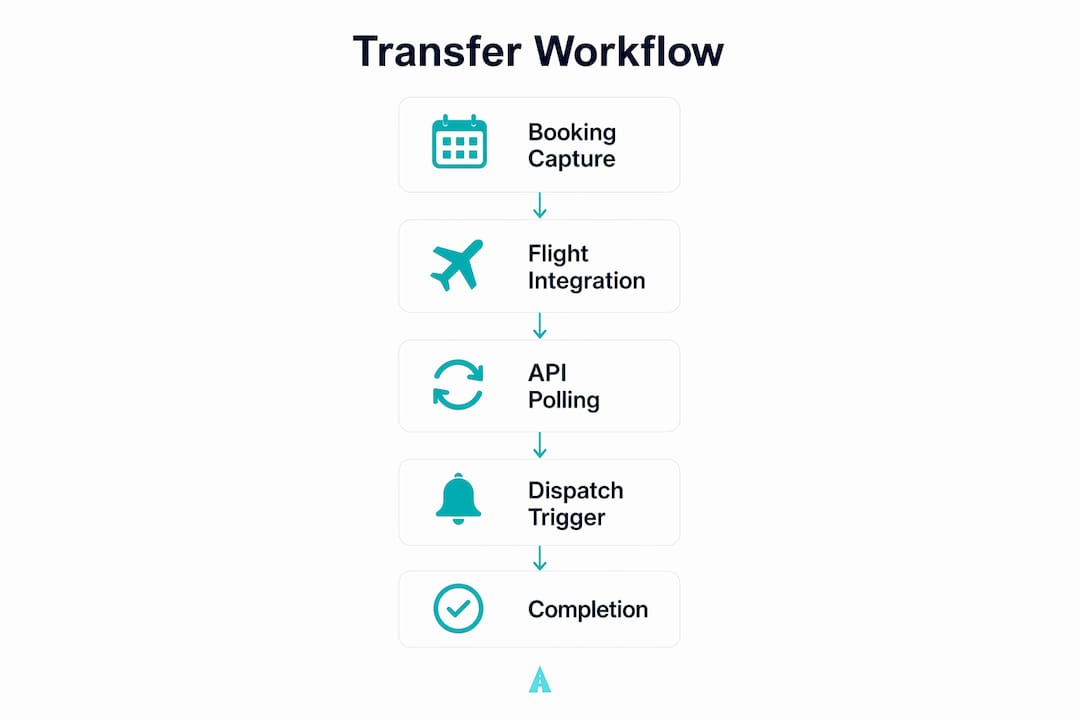
The flight tracking integration also covers orphaned booking interception. When the API reports a cancellation against a tracked flight number, the system instantly releases the assigned driver back to the available pool rather than leaving them waiting at the curb for a flight that will never land.

What are the real operational benefits of automating this workflow?
Automated flight-tracking dispatch can save dispatchers multiple hours of manual work daily at moderate booking volumes. That time compounds quickly when you are managing airport pickups across several terminals or international arrivals at once.
Using a flight status API reduces driver idle time by adjusting dispatch triggers based on gate arrival events rather than generic scheduled times. A driver released at the right moment, not unnecessarily early, means lower parking costs, less driver frustration, and more trips completed per shift. Manual dispatch generally breaks down above 30–50 daily bookings, when automated state transitions become essential to protect both margins and service quality.
Operational impact: A modest reduction in idle time per pickup, applied over a day’s bookings, quickly returns driver and vehicle capacity to revenue-generating trips rather than curbside waiting.
Passenger satisfaction improves directly. Flight tracking enables meet-and-greet workflows by pushing driver notifications tied to the flight-landed event and the correct terminal, so your driver is in position before the passenger clears baggage claim. Proactive SMS updates at key events (flight landed, driver dispatched, driver at pickup) keep passengers informed without overwhelming them with every minor status change.
How do you design a scalable flight transfer workflow using status APIs?
The most reliable architecture treats your dispatch system as a state machine. Every flight status change is a logic gate that controls a physical action. You write the logic once, and it applies consistently whether the arrival airport is Chicago O'Hare (ORD) or any international hub your operation serves.
Best practice checklist for workflow design:
- Use
flight_numbercombined with departure date as the exact parameter for API subscriptions. - Poll status every 2–5 minutes once a flight is within two hours of arrival.
- Apply buffer-adjusted ETAs of 20 minutes for domestic arrivals and 45 minutes for international arrivals after gate arrival, not just landing, to account for taxi-in time, deplaning, and baggage claim.
- Set driver release time as buffer-adjusted ETA minus drive time from the driver's current position to the staging area.
- Configure automated orphaned booking interception: cancellation status releases the driver instantly.
- Build diversion handling as a mandatory exception branch, not an afterthought.
- Log every status transition with a timestamp for billing, auditing, and dispute resolution.
Pro Tip: Use n8n's event-driven trigger nodes to watch for specific status field transitions rather than polling the full flight list. This cuts API call volume significantly and fires dispatch actions within seconds of a status change, protecting your profit margins on time-sensitive pickups.
Flight status data must be transformed into a rules layer where each status change triggers a specific operational action. Sequencing pickups, allocating backup vehicles, and releasing drivers all flow from that rules layer automatically, with no dispatcher intervention required for standard arrivals.
What are the most common challenges in flight transfer workflows, and how do you fix them?
Early arrivals catch operations off guard more often than delays do. When a flight lands 30 minutes ahead of schedule, a driver allocated to the original time arrives after the passenger has already cleared the terminal. The fix is automated re-timing: your system should pull the pickup forward the moment the early ETA appears in the API feed, re-release the driver based on the new time, and send the passenger a "your driver is on the way" notification triggered by the landed event.
Diversions are the toughest edge case. A diversion handler should automatically flag the new destination airport, calculate whether it falls within your service area, and surface pre-set dispatcher options: re-route the original driver, reassign to a partner at the diversion airport, or convert the job to a refund and rebooking. The original booking record, flight number, and full timeline stay preserved for billing and corporate reporting.
Practical troubleshooting checklist:
- Set a delay threshold (typically 90 minutes) above which the dispatcher queue surfaces the job for manual review.
- Configure driver release logic to recalculate automatically on every status update, not just the first one.
- Use orphaned booking interception to release drivers the moment a cancellation is confirmed.
- Require flight number as a mandatory field on every booking channel, including phone and corporate portals.
- Train dispatchers on the exception queue, not the full flight list. They should only see jobs that automation cannot resolve.
- Audit buffer times per terminal using your own historical landed-to-curb data, then tune them quarterly.
Data security and privacy matter here too. Passenger names, booking details, and flight identifiers are personal data under US privacy frameworks. Store only what your dispatch workflow requires, apply role-based access controls to your API integrations, and confirm that any third-party flight data provider complies with applicable data handling standards. For operations connecting with digital travel solutions across international routes, verifying data residency and API security certifications is a practical first step before going live.
Staff training and change management determine whether the technology actually delivers. Dispatchers accustomed to manual monitoring need to understand that their role shifts from watching flight boards to managing exceptions. A phased rollout works well: enable flight number capture in week one, activate auto-retiming in week two, add driver app notifications in week three, and review buffer performance in weeks five through eight before launching premium services like meet-and-greet.
KPIs to monitor ongoing effectiveness:
- Driver idle time per pickup (target: reduction after each buffer tuning cycle)
- Orphaned booking interception rate (measures how often automation catches cancellations before driver dispatch)
- On-time passenger pickup rate
- Dispatcher manual interventions per 100 bookings (should decrease as automation matures)
- Passenger notification delivery rate at key events
How Easytransfer puts this into practice

Easytransfer applies this exact workflow for private transfers across Iceland, including routes between Keflavík Airport, Reykjavík, Blue Lagoon, and Sky Lagoon. Every booking captures the flight number at the point of reservation. The system monitors live flight status continuously and adjusts driver dispatch timing based on actual gate arrival, not the original scheduled time. Passengers receive proactive updates at key moments, and the 24/7 support team handles any exception that automation flags for human review.
For travel agencies and B2B partners, Easytransfer's private transfer services handle groups of up to 49 passengers with the same flight-tracking logic applied at scale. Fixed pricing, instant booking confirmation, and a 24-hour cancellation policy for a full refund make it straightforward to coordinate on behalf of clients. You can request a custom quote for any pickup and drop-off location across Iceland directly through the site, and a sales agent responds within 24 hours.
Key Takeaways
A well-built flight tracking transfer workflow turns live API data into automated dispatch decisions, protecting driver time, passenger experience, and operational margins simultaneously.
| Point | Details |
|---|---|
| Flight number is the binding key | Use flight_number plus departure date to subscribe each booking to real-time status updates. |
| State machine logic scales operations | Automated status transitions handle standard arrivals without dispatcher intervention above 30–50 daily bookings. |
| Buffer-adjusted ETAs prevent early dispatch | Add 20 minutes for domestic and 45 minutes for international arrivals after gate arrival to time driver release accurately. |
| Orphaned booking interception protects margins | Cancellation status automatically releases the assigned driver, eliminating ghost-flight dispatches. |
| KPIs measure workflow health | Track driver idle time, interception rate, and manual interventions per 100 bookings to guide ongoing tuning. |